Native Mac app for Gmail · Public beta

Gmail,
the way a Mac
should do it.

All your Gmail accounts in a native Mac app. Translate messages and summarize threads on your device, not in someone else's cloud.

  • Free during the public beta
  • Needs macOS 27 on Apple silicon
  • Installs through Apple's TestFlight
  1. 01Native Gmail
  2. 02Translation
  3. 03Summaries
  4. 04No mail server
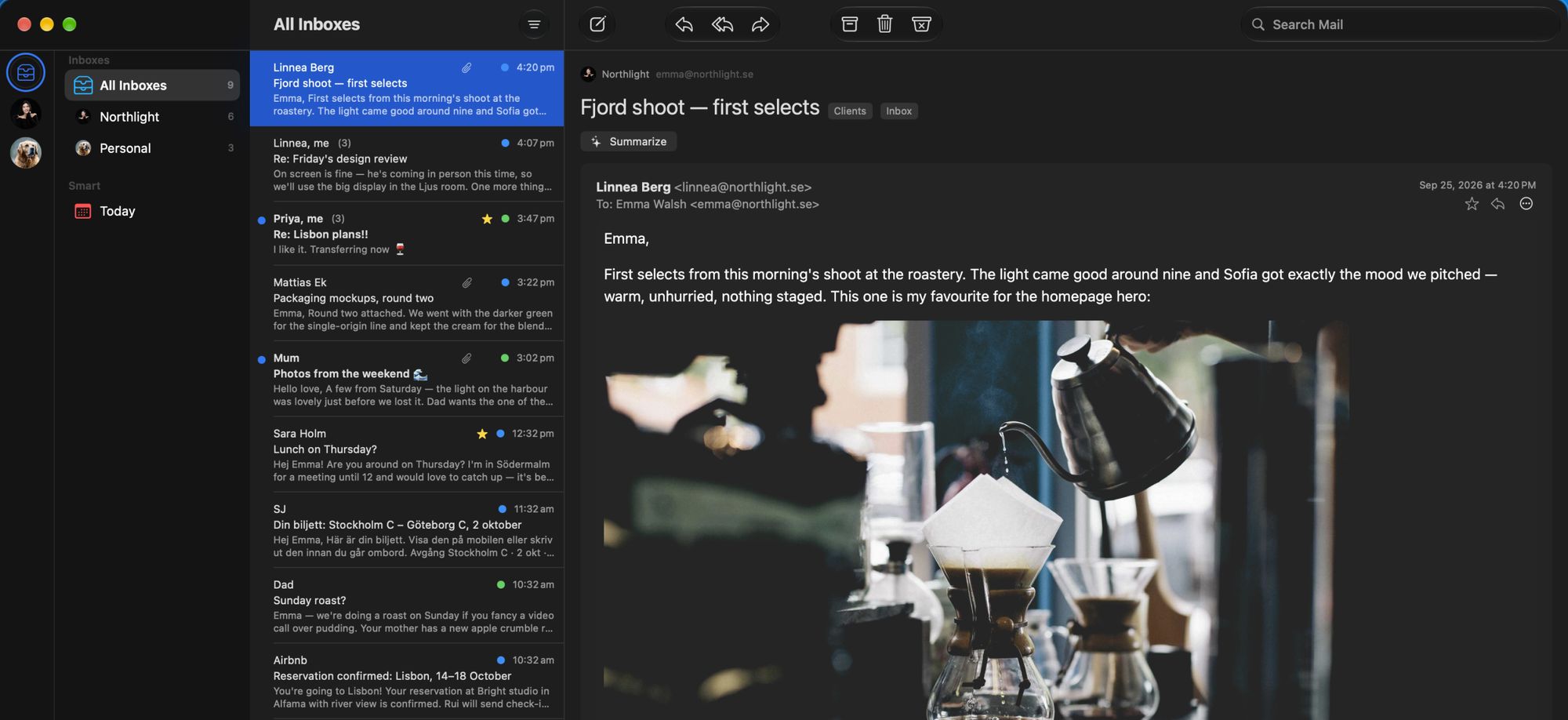
Behind it, Merubo in Dark Mode showing All Inboxes for two accounts, each message marked with a blue or green account dot.

All InboxesTwo accounts, one list, a colour per account

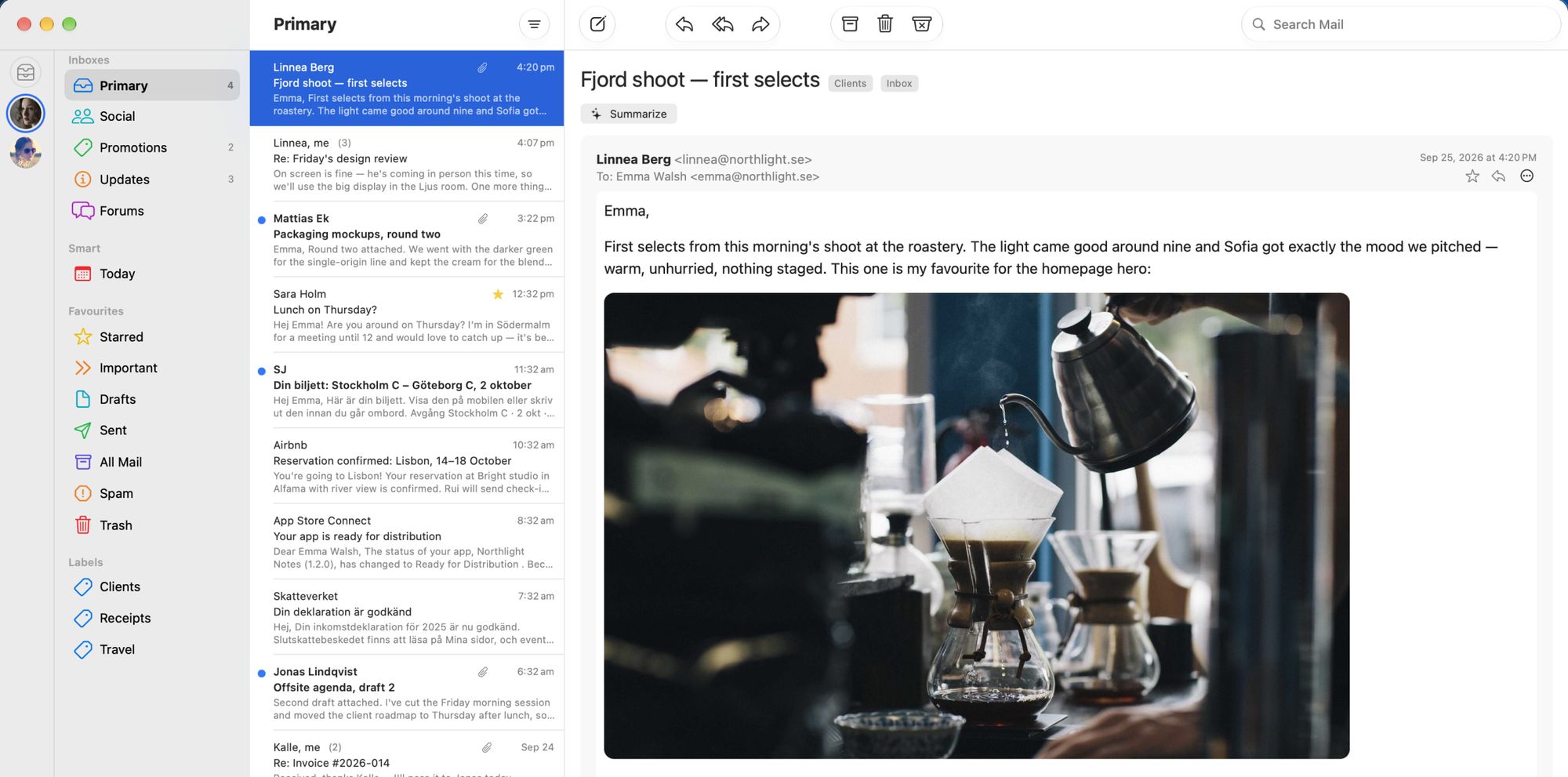
Merubo's main window: a sidebar with Primary, Social, Promotions, Updates and Forums plus labels; the Primary inbox list in the middle; and an open message with a photo on the right. A Summarize button sits above the message.

PrimaryGmail's categories, labels and search, in a Mac window

Built for Gmail

Gmail, at home
on your Mac.

Merubo speaks to Google's Gmail API directly, so the parts of Gmail you rely on behave the way Gmail does, inside a real three-pane Mac window.

  • Categories and labels, as Gmail keeps them

    Primary, Social, Promotions and Updates are inbox categories, not folders. Labels are labels. Archive puts a thread in All Mail.

  • Gmail's own search

    Type the operators you know, from:sara has:attachment, and Gmail runs the search, with results in a Mac list.

  • Both keyboards, one app

    E archives, # deletes, S stars. Dark Mode, notifications, a Dock badge and drag-and-drop attachments come with the Mac.

Merubo covers the everyday Gmail features, not all of them. Snooze, filters and the vacation responder are not in the app; gmail.com is a click away for those.

Merubo's main window with the Primary inbox selected: the sidebar, the message list and an open message from Linnea Berg with its Clients and Inbox labels.
Enlarged: the sidebar's Inboxes group with Primary selected and showing 4 unread, then Social, Promotions with 2, Updates with 3, and Forums, each with its own coloured icon.

Gmail's inbox categories, with their unread counts, in a Mac sidebar.

Translation

Read across languages.

Mail that arrives in another language is translated into yours before you open it, by the translation built into macOS. The message is read on your Mac and nowhere else. One click shows the original.

Original as it arrived, in Swedish

SJ
SJ <noreply@sj.se>
Din biljett: Stockholm C – Göteborg C, 2 oktober

Hej Emma,

Här är din biljett. Visa den på mobilen eller skriv ut den innan du går ombord.

AvgångStockholm C · 2 okt · 07:12
AnkomstGöteborg C · 2 okt · 10:19
TågSJ Snabbtåg 421 · Vagn 4 · Plats 22, fönster

Translated as Merubo shows it

SJ
SJ <noreply@sj.se>
Din biljett: Stockholm C – Göteborg C, 2 oktober

Hi Emma,

Here is your ticket. Show it on your phone or print it before you board.

DepartureStockholm C · 2 Oct · 07:12
ArrivalGöteborg C · 2 Oct · 10:19
TrainSJ Snabbtåg 421 · Coach 4 · Seat 22, window

Translated on your Mac. Sample mail drawn from Merubo's interface; the "Translated from" line, Show Original and ⌘T are the real controls.

How it works
Merubo detects the language of each message and translates in the background, newest first, using Apple's Translation framework. Links and formatting are kept; the original is always one click away.
What it needs
A translation model for your Mac's language. macOS offers the download the first time; nothing else is required. Apple Intelligence is not needed for translation.
Which languages
The languages macOS can translate into your language. Merubo tells you when a message's language isn't supported, rather than guessing.

Summaries

Catch up on the conversation.

A long thread, summarized into a short paragraph by Apple Intelligence, on your Mac. Nothing is summarized until you click Summarize, and the summary streams into a card above the thread so the messages stay right there to check against.

What it needs
Apple Intelligence turned on in System Settings. On a Mac without it, the button isn't shown.
What to expect
Summaries are generated text. They are usually right about who said what and what was decided, and they can miss a nuance, which is why the thread stays open underneath.
Summarized on your Mac

Re: Friday's design review Clients Inbox

Summarize

Linnea confirmed that Friday's review will happen in person in the Ljus room on the big display rather than over a screen share, and asked for the agenda by Thursday. You agreed to send it Thursday evening, offered to bring the printed packaging mockups, and proposed starting at 10.

Summarized on device
  1. Emma WalshWed 2:10 pm

    Linnea, for Friday's review: shall we do it on screen? I can share the Figma file and we save the printing.

  2. Linnea BergWed 3:48 pm

    On screen is fine, but he's coming in person this time, so we'll use the big display in the Ljus room. One more thing: can you send the agenda by Thursday?

  3. Emma WalshWed 4:07 pm

    Will do. Agenda by Thursday evening, and I'll bring the printed packaging mockups too. Start at 10?

Illustration with sample mail; the summary is example output, not a recording of the model.

Accounts

All your accounts, without the juggling.

Work, personal and the side project, each a Gmail or Google Workspace account, in one window. Read them together in All Inboxes, where a colour dot on every message says which account it came from, or keep them apart. Switching is one click or one keystroke.

Merubo in Dark Mode showing All Inboxes. Two accounts, Northlight and Personal, are listed in the sidebar, and each message in the list has a blue or green dot marking its account.

All Inboxes in Dark Mode. Blue is Northlight, green is Personal.

Identity
Each account gets its name and photo from Google, plus a colour and a short description you choose. That colour follows the account everywhere: the sidebar, the message list, the compose window.
Switching
⌃⌘1 to ⌃⌘9 jump to an account in the order you keep them; ⌃⌘0 is All Inboxes. Notifications and the Dock badge can follow all accounts or just one.
Only Gmail
Merubo connects to Gmail and Google Workspace accounts. It does not support Outlook, iCloud, Yahoo or other IMAP providers.

Privacy

There is no Merubo mail server.

Your email goes directly between your Mac and Google. Merubo never receives it. Translation, summaries and the copy of recent mail that makes the app fast all stay inside your Mac.

Your Mac
Merubo
  • Recent mail cacheYour latest mail, kept on this Mac so opening and searching is instant. Deleting it is always safe.
  • TranslationApple's Translation framework, with models on this Mac.
  • SummariesApple Intelligence's on-device model, only when you ask.
Google Gmail, through the Gmail API. Your mailbox stays in your Google account, as it always has.
  • Sign-in is Google's. You sign in on Google's own screen, with OAuth. Merubo never sees or stores your Google password.
  • Two permissions, nothing more. Read, compose and send mail, and your name and profile photo. Merubo asks for no other access to your Google account.
  • Tokens live in the macOS Keychain, one item per account, readable only by Merubo on this Mac.
  • Revocable any time. Remove Account deletes the cache and tokens and revokes Merubo's access at Google. You can also revoke it at myaccount.google.com/permissions.
  • No analytics, no tracking, in the app or on this site.

The two exceptions, both yours to ask for

Remote images in a message are blocked by default. If you choose to load them, your Mac fetches them from the sender, as any mail app would.

If you unsubscribe from a mailing list and confirm it, Merubo sends one request to the address the sender published. It goes to the sender, not to Merubo.

Mail is cached on your Mac the way your other files are: protected by your user account, and by FileVault if it is on. Merubo does not add an encryption layer of its own. The full detail is in the privacy policy.

The details

The details you expect.

  • Gmail's own search

    Type the operators you know and Gmail runs the search; results land in a Mac list. ⌘F to start, Escape to leave.

    from:sara has:attachment
  • Categories and labels

    Primary, Social, Promotions, Updates and Forums, each on or off per account. Your labels, with Gmail's colours, and Move to and Label from the toolbar.

  • Keyboard first

    Gmail's single keys and the Mac's menus, together.

    EArchive#DeleteSStar⌘TOriginal
  • Trackers blocked

    Tracking pixels from more than 180 known vendors are removed before a message is drawn, and Merubo names who was watching. The list ships inside the app and is never downloaded.

  • Unsubscribe

    A mailing-list message shows an Unsubscribe banner. Nothing is sent until you confirm, and the confirmation names the sender and the account.

  • Made for the Mac

    Dark Mode, notifications and a Dock badge with their own account scope, attachments dropped into a reply, downloads straight to your Downloads folder, and Apple silicon only, so the on-device models have room to work.

Why Merubo

Who it's for, and what to know first.

Merubo is for people who live in Gmail on a Mac and want it to feel like a Mac app: a window, not a tab. It earns its place if you get mail in more than one language, or want thread summaries without sending your mail to a cloud service.

It is a public beta from a small company. Expect rough edges, and expect them fixed. Snooze, filters and the vacation responder are not planned, and outgoing mail is kept simple: text, links and images, without fonts, colours or tables.

If you need a released app today, run an Intel Mac, or rely on Gmail's power features, Mimestream is the other native Gmail client for Mac and may suit you better. We say so in the comparison.

Who makes it

Merubo is made by Clovelly AB in Sweden. Questions, bugs and feature requests go to hello@merubo.app, and they are read by the person who builds the app.

Merubo is an independent app. It is not made by, endorsed by or affiliated with Google.

Getting started

Three steps, about two minutes.

Merubo's beta is distributed through TestFlight, Apple's own app for trying apps before they reach the App Store. No account with us, no email address, nothing to fill in.

  1. 1

    Install TestFlight

    Get Apple's free TestFlight from the Mac App Store, if it isn't already on your Mac.

  2. 2

    Install the Merubo beta

    Open Merubo's beta link on your Mac, accept, and TestFlight installs Merubo and keeps it updated.

  3. 3

    Sign in with Google

    Open Merubo and sign in on Google's screen. Make sure the Gmail access box is ticked, since Google may show it unticked. Your inbox appears, and a short tour covers notifications and translation.

Try the free beta

Needs a Mac with Apple silicon on macOS 27 or later, and Apple's free TestFlight app. Beta builds expire after 90 days; TestFlight offers the update.

Reading this on your phone? Merubo is a Mac app. Email yourself the link, or open merubo.app on your Mac.

Questions

Before you install.

Anything missing? Ask at hello@merubo.app.

What do I need to run Merubo?

A Mac with Apple silicon running macOS 27 or later, and a Gmail or Google Workspace account. During the beta you also need Apple's free TestFlight app. Translation needs a translation model for your Mac's language, which macOS offers to download. Summaries need Apple Intelligence turned on in System Settings.

What is TestFlight, and is it safe?

TestFlight is Apple's own app for trying apps before they reach the App Store. You install it from the Mac App Store, open Merubo's beta link, and TestFlight installs Merubo and keeps it updated. Beta builds expire after 90 days, so you will be asked to update occasionally.

How much does Merubo cost?

Merubo is free during the public beta. At release it will be a yearly subscription on the Mac App Store with a 7-day free trial, covering every Gmail account you connect on every Mac signed in with your Apple Account. The price has not been announced yet. See the terms.

Does Merubo have a server? Can you read my email?

There is no Merubo mail server. Your mail goes directly between your Mac and Google over HTTPS, and translation and summaries run on your Mac. Merubo never receives your mail and has no analytics or tracking. The two exceptions are things you ask for: loading a message's remote images fetches them from the sender, and confirming an unsubscribe sends one request to the address the sender published. The privacy policy has the detail.

How do changes in Merubo show up in Gmail?

Merubo works through Google's Gmail API, so archiving, deleting, starring, labels and read state are changes to your Gmail account itself. Gmail on the web and on your phone show the same thing, and mail you send from Merubo appears in Gmail's Sent.

How do I remove an account or revoke access?

Settings ▸ Accounts ▸ Remove Account deletes that account's cached mail and sign-in tokens from your Mac and revokes Merubo's access at Google. You can also revoke access at any time at myaccount.google.com/permissions.

Does Merubo work with Outlook, iCloud or other email providers?

No. Merubo works with Gmail and Google Workspace accounts only.

How is Merubo different from Apple Mail with a Gmail account?

Apple Mail treats Gmail as a generic mail account over IMAP. Merubo is built only for Gmail, through the Gmail API, so categories, labels, archive and Gmail's own search operators behave as they do in Gmail. It also translates mail and summarizes threads on your Mac.

How does Merubo compare with Mimestream?

Both are native Mac apps that connect directly to the Gmail API. Mimestream has shipped for years and has a deeper Gmail feature set. Merubo adds on-device translation and thread summaries and is in public beta. See Merubo vs Mimestream.

Try the Merubo beta.

Gmail in a native Mac app, with translation and summaries that stay on your Mac.

Try the free beta

Free during the beta · macOS 27 on Apple silicon · Installs through Apple's TestFlight